The world’s first multi-agent AI platform that turns ideas into production-ready applications — no coding required
As someone who’s been in the tech industry for over a decade, watching AI tools evolve from simple autocomplete to sophisticated multi-agent systems, I approached MGX with healthy skepticism. Could an AI agent orchestration platform really replace or augment a traditional development team? After building 15+ projects ranging from simple landing pages to complex full-stack applications, here’s everything you need to know.
Ready to Experience AI-Powered Development?
What is MGX (MetaGPT X)? Understanding the AI Agent Framework
MGX MetaGPT X launched on February 19, 2025, as the commercial evolution of the wildly successful MetaGPT open-source framework (60,700+ GitHub stars). While MetaGPT was the groundbreaking research project that introduced the concept of multi-agent AI systems working like a real software company, MGX is the polished, production-ready platform that makes this technology accessible to everyone.
The Core Concept: Your Virtual Software Company
Imagine having access to a complete development team that includes:
Translates your idea into technical requirements, user stories, and feature specifications
Designs the system architecture, data models, and API structure for optimal performance
Writes clean, production-ready code using React, Tailwind CSS, and modern frameworks
Tests functionality, identifies bugs, and ensures quality before deployment
These aren’t just fancy labels—each AI agent specializes in their domain, follows industry-standard SOPs (Standard Operating Procedures), and collaborates in real-time. This is what makes MGX’s multi-agent AI system fundamentally different from single-agent tools like ChatGPT or Copilot.
What’s in the Box: The MGX Platform
When you sign up for MGX (it’s free to start), you get access to:
- ✅ Web-based IDE with real-time preview and editing
- ✅ Multi-agent orchestration system (PM, Architect, Engineer, QA)
- ✅ Natural language programming interface (just describe what you want)
- ✅ GitHub/GitLab integration for version control and deployment
- ✅ Project templates for websites, dashboards, games, SaaS apps
- ✅ Cloud deployment with one-click publishing
- ✅ Mobile-responsive output by default
- ✅ Access to latest AI models (Gemini 3 Pro, GPT-4, Claude, DeepSeek)
Key Specifications That Matter
| Specification | Details | Why It Matters |
|---|---|---|
| Technology Stack | React, Vite, Tailwind CSS, Modern JS | Industry-standard, production-ready code |
| Development Speed | Minutes to hours vs weeks/months | 90% faster time-to-market |
| Learning Curve | Zero coding knowledge required | Accessible to entrepreneurs, designers, PMs |
| Code Quality | Clean, documented, maintainable | Can be customized by developers post-generation |
| Deployment Options | One-click cloud, GitHub Pages, custom hosting | Flexibility in how you publish |
| Storage Space | 2GB (Free) to 40GB (Max) | Supports projects of all sizes |
Price Point & Value Positioning
Here’s the reality check: Traditional development costs for a full-stack application range from $10,000 to $50,000+ and take 2-6 months. With MGX MetaGPT X pricing starting at $0 (Free plan) and going up to $100/month for unlimited usage, you’re looking at a 99% cost reduction and 90% time savings.
Who This Platform is Designed For
Build MVPs and validate ideas without hiring a dev team
Create professional websites and tools without technical knowledge
Accelerate prototyping and focus on high-value customization
Turn design concepts into functional applications instantly
Create working prototypes for stakeholder demos
Learn software development concepts hands-on
See What You Can Build in 5 Minutes
MGX in Action: Watch the Platform Build a Full Application
This 11-minute walkthrough shows exactly how MGX’s AI agent collaboration works to create a production-ready application:
Design & Build Quality: How Does MGX Stack Up?
Visual Appeal: Modern, Clean, Intuitive
The MGX platform interface is surprisingly polished. Unlike many AI tools that feel like academic experiments, MGX MetaGPT X has clearly been designed with user experience in mind. The dashboard is clean, the chat interface feels natural (similar to ChatGPT but with more context), and the live preview pane updates in real-time as agents work.
What I Loved:
- Dark mode and light mode options
- Split-screen view (chat + code + preview)
- Syntax highlighting in code editor
- Agent activity indicators (you can see which AI agent is currently working)
- Clean project management dashboard
Minor Gripes:
- The mobile app version is limited compared to desktop
- No offline mode (requires internet connection)
- Loading times can vary based on project complexity
Materials and Construction: Code Quality Assessment
This is where the rubber meets the road. I ran the generated code through multiple quality checks:
Score: 9/10 – Clean, well-commented, follows React best practices. A human developer can easily understand and modify the code.
Score: 8/10 – Implements basic security measures, though complex authentication needs manual review.
Score: 8.5/10 – Optimized bundle sizes, lazy loading implemented, good Lighthouse scores (85-95).
Score: 9.5/10 – Excellent mobile-first design with Tailwind CSS breakpoints properly implemented.
Ergonomics & Usability: The No-Code Promise
MGX delivers on its core promise: you don’t need to know how to code. During my testing, I had three non-technical friends (a restaurant owner, a yoga instructor, and a marketing consultant) try the platform. Within 30 minutes, each had created a functional website for their business.
“I’ve tried Wix, Squarespace, and WordPress. This is different. Instead of dragging boxes around, I just told it what I wanted, and it BUILT it. My photography portfolio went live in 2 hours.”
The conversational interface is key here. You can say things like:
- “Make the hero section taller and change the background to a gradient”
- “Add a contact form with email validation”
- “The pricing cards should have hover animations”
- “Integrate Stripe for payments”
And the AI agents for SaaS development understand and implement these requests with remarkable accuracy.
Durability Observations: Long-Term Concerns
After 90 days of use, here’s what I’ve observed:
- Project Stability: Generated projects remain stable over time. I deployed 5 projects in February that are still running without issues in April.
- Platform Updates: MGX has pushed 3 major updates in 3 months (Gemini 3 Pro integration, Race Mode, UI overhaul). The pace of improvement is impressive.
- Code Maintenance: You own the code. Export it to GitHub and maintain it yourself if needed. This is crucial for long-term viability.
- Dependency Management: Uses current, stable versions of libraries. No deprecated packages in my test projects.
Performance Analysis: Where MGX Shines (and Where It Doesn’t)
Core Functionality: The AI Agent Workflow
The MGX AI agent framework operates on a revolutionary workflow that mimics how real software teams work:
What happens: The PM agent asks clarifying questions, understands your vision, and creates a detailed specification document.
My experience: This phase is surprisingly thorough. The AI asks about target audience, key features, design preferences, and technical requirements. It caught potential issues I hadn’t even considered (like “Do you want user authentication?” when I requested a dashboard).
Time taken: 2-5 minutes depending on project complexity
What happens: The Architect agent designs the technical architecture, data models, API structure, and component hierarchy.
My experience: This is where MGX’s multi-agent approach really shines. The architecture decisions are sound—proper component separation, logical folder structure, scalable design patterns.
Time taken: 1-3 minutes
What happens: The Engineer agent writes the actual code—HTML, CSS, JavaScript, React components, API calls, state management.
My experience: Code quality is consistently good. Uses modern React patterns (hooks, context, custom hooks), Tailwind for styling, and proper error handling. It’s code I’d be comfortable deploying.
Time taken: 5-20 minutes depending on project size
What happens: The QA agent tests functionality, identifies bugs, checks responsive design, and ensures accessibility standards.
My experience: This agent caught layout issues on mobile, broken links, and console errors. Not perfect (missed some edge cases), but better than no QA.
Time taken: 2-5 minutes
Real-World Testing Scenarios: 5 Projects I Built
To truly test MetaGPT X enterprise AI capabilities, I built diverse projects. Here are the results:
| Project Type | Complexity | Time with MGX | Traditional Dev Time | Result Quality |
|---|---|---|---|---|
| Landing Page for SaaS | Simple | 8 minutes | 2-4 days | ⭐⭐⭐⭐⭐ (Excellent) |
| E-commerce Store | Medium | 35 minutes | 2-3 weeks | ⭐⭐⭐⭐ (Good, needed manual Stripe setup) |
| Analytics Dashboard | Medium-High | 52 minutes | 3-4 weeks | ⭐⭐⭐⭐½ (Great data viz, API integration perfect) |
| Blog Platform | Medium | 28 minutes | 1-2 weeks | ⭐⭐⭐⭐⭐ (Production-ready) |
| Puzzle Game (Match-3) | High | 1 hour 45 minutes | 4-6 weeks | ⭐⭐⭐⭐ (Impressive game logic, minor bugs fixed manually) |
Key Performance Categories
Speed & Efficiency
Rating: 9.5/10
This is MGX’s killer feature. The AI agent workflow automation compresses weeks of work into minutes. Even accounting for manual refinements and testing, you’re looking at 80-90% time savings compared to traditional development.
Code Quality & Maintainability
Rating: 8/10
The generated code is clean, follows best practices, and is well-commented. However, complex business logic sometimes needs human review. Think of MGX output as a “senior junior developer”—fast, competent, but benefits from oversight.
Flexibility & Customization
Rating: 8.5/10
You can iterate endlessly through conversation. The AI agents understand context and make intelligent updates. However, very specific design requirements (like exact pixel spacing or complex animations) sometimes require manual CSS tweaking.
AI Model Selection & Quality
Rating: 9/10
MGX supports multiple AI models (Gemini, GPT-4, Claude, DeepSeek). The “Race Mode” (Max plan) runs requests through multiple models and picks the best output, significantly improving accuracy. This multi-agent LLM framework approach is brilliant.
Experience the Speed Yourself
User Experience: From Zero to Deployed in Record Time
Setup & Installation: Refreshingly Simple
Unlike traditional development which requires installing Node.js, package managers, code editors, and wrestling with dependencies, MGX setup is literally 60 seconds:
- Go to mgx.dev
- Sign up with email or Google
- You’re in. Start building.
No credit card required for the free tier. No configuration files. No terminal commands. This is the promise of no-code AI builder platforms done right.
Daily Usage: What It’s Actually Like
After 90 days, here’s my typical workflow:
Describe the idea in plain English. The PM agent asks clarifying questions. Takes 5-10 minutes to align on requirements.
Watch the agents work in real-time. Engineer agent codes, QA agent tests. I grab coffee while they collaborate.
Iterate on design, request changes conversationally. “Make the buttons bigger,” “Add a pricing section,” “Change color scheme to blue.”
One-click deployment to MGX cloud, or export to GitHub for custom hosting. Project live in minutes.
Learning Curve: Can Non-Developers Really Use This?
Short answer: Yes.
I watched my mother (a retired teacher with zero tech background) create a functional website for her book club in 45 minutes. She described what she wanted, the AI asked questions, and she got a working site.
“I expected this to be complicated. It wasn’t. I just talked to it like I was explaining my idea to a friend who happens to be a really good developer. That friend happens to be AI.”
Learning curve breakdown:
- Non-technical users: 15-30 minutes to understand the interface and workflow
- Designers: 5-10 minutes (interface is intuitive)
- Developers: Instant. Plus you can directly edit generated code
Interface & Controls: Conversational AI Done Right
The chat-based interface is surprisingly powerful. Unlike rigid form-based builders, MGX’s AI agent collaboration system understands natural language with impressive accuracy:
• “Add a testimonials section with 3 cards in a grid”
• “Make the header sticky when scrolling”
• “Integrate Google Analytics”
• “The mobile menu isn’t working, can you fix it?”
• “Generate 5 blog post examples with realistic content”
The system maintains context throughout the conversation, so you can reference previous elements (“make that section bigger”) without confusion.
Collaboration Features for Teams
While I primarily tested as a solo user, MGX supports team collaboration:
- Share projects with team members (unlimited on all plans)
- Comment on specific sections
- Version history to track changes
- Role-based permissions (viewer, editor, admin)
For enterprise AI agents and team workflows, this makes MGX viable for agencies and product teams.
Comparative Analysis: MGX vs AutoGPT vs CrewAI vs Traditional Development
After testing 27 different multi-agent tools (as Bill Xu documented in his excellent Medium article), here’s how MGX MetaGPT X stacks up against the competition:
The Multi-Agent AI Landscape in 2025
| Platform | Type | Learning Curve | Code Quality | Speed | Best For |
|---|---|---|---|---|---|
| MGX (MetaGPT X) | Product (No-Code) | Easy ⭐⭐⭐⭐⭐ | High ⭐⭐⭐⭐ | Very Fast ⭐⭐⭐⭐⭐ | Entrepreneurs, businesses, rapid MVP development |
| MetaGPT (Open Source) | Framework | Moderate ⭐⭐⭐ | Very High ⭐⭐⭐⭐⭐ | Fast ⭐⭐⭐⭐ | Developers wanting full control and customization |
| AutoGPT | Framework | Hard ⭐⭐ | Variable ⭐⭐⭐ | Slow ⭐⭐ | Autonomous task automation, research |
| CrewAI | Framework | Moderate ⭐⭐⭐ | High ⭐⭐⭐⭐ | Moderate ⭐⭐⭐ | Custom multi-agent workflows, enterprise |
| LangChain Agents | Framework/Toolkit | Hard ⭐⭐ | Depends on implementation | Varies ⭐⭐⭐ | Building blocks for custom agent systems |
| Traditional Dev Team | Human | N/A | Very High ⭐⭐⭐⭐⭐ | Slow ⭐⭐ | Complex, mission-critical applications |
Direct Comparison: MetaGPT X vs CrewAI
These are the two leading enterprise AI agent platforms in 2025:
MGX (MetaGPT X) Advantages
- Zero setup required (web-based)
- No coding knowledge needed
- Built-in deployment infrastructure
- Faster time-to-result (minutes vs hours)
- Better UI/UX for non-developers
- Pre-trained for software development specifically
- One-click GitHub integration
CrewAI Advantages
- More flexible for custom workflows
- Can build agents for any domain (not just coding)
- Open-source (free)
- More control over agent behavior
- Better for research and experimentation
- Supports more LLM providers
The Verdict: If you’re building software applications and want the fastest path from idea to deployment, MGX MetaGPT X wins. If you’re a developer building custom agent systems for non-software tasks (data analysis, research, business process automation), CrewAI offers more flexibility.
Price Comparison: The Cost Factor
| Solution | Upfront Cost | Monthly Cost | Time Investment | Total 1st Year Cost |
|---|---|---|---|---|
| MGX Free Plan | $0 | $0 | Hours | $0 |
| MGX Pro Plan | $0 | $20 | Hours | $240 |
| MGX Max Plan | $0 | $100 | Hours | $1,200 |
| Freelance Developer | $5,000-15,000 | $0 | Weeks/Months | $5,000-15,000 |
| Dev Agency | $15,000-50,000+ | $0-2,000 (maintenance) | Months | $15,000-75,000+ |
| In-House Team | $200,000+ (salaries) | $16,600+ (avg) | Ongoing | $200,000+ |
Unique Selling Points: What Sets MGX Apart
- It’s a Product, Not a Framework – No coding required. No setup. Just start building.
- Multi-Agent Orchestration – Not a single AI, but a coordinated team with specialized roles.
- Production-Ready Output – Deploy immediately or export to continue development.
- Continuous Learning – Platform improves weekly with updates and new capabilities.
- Built on ICLR 2024 Research – Academic rigor backing a commercial product.
- Race Mode (Max Plan) – Runs prompts through multiple AI models and picks the best result.
When to Choose MGX Over Competitors
Choose MGX if:
- You want to build web applications, SaaS platforms, or websites
- You need results in hours/days, not weeks/months
- You’re not a developer (or you are, but want 10x speed)
- Budget is limited (<$1,000)
- You want to validate ideas quickly before investing heavily
Choose Traditional Development if:
- Building a mission-critical financial or healthcare application
- Require extensive custom integrations with legacy systems
- Need ongoing, complex feature development
- Security and compliance are paramount
Choose Open-Source Frameworks (MetaGPT, CrewAI) if:
- You’re a developer who wants maximum control
- Building custom agent systems for non-software tasks
- Need to integrate deeply with existing codebases
- Researching AI agent architectures
See How MGX Compares in Real-Time
Honest Assessment: What I Loved and What Needs Work
What We Loved: The Game-Changers
- Unbelievable Speed: 90% faster development time is not an exaggeration. Projects that take weeks happen in hours.
- Code Quality: Clean, maintainable, production-ready code that follows React best practices.
- No Learning Curve: My non-technical friends built functional websites in under an hour. That’s revolutionary.
- Multi-Agent Intelligence: The collaboration between PM, Architect, Engineer, and QA agents produces better results than single-agent tools.
- Real-Time Iteration: Make changes conversationally and see results instantly. No waiting for developer availability.
- Cost Efficiency: $0-100/month vs $15,000+ for traditional dev. The ROI is absurd.
- Deployment Made Easy: One-click publishing or GitHub export. No DevOps headaches.
- Gemini 3 Pro Integration: Latest AI models make the output increasingly intelligent.
- Project Ownership: You own the code. Export it and do whatever you want with it.
- Active Development: Platform is improving weekly with new features and bug fixes.
Areas for Improvement: The Reality Check
- Complex Logic Requires Review: While simple to medium complexity apps work great, very complex business logic sometimes needs human verification.
- Design Precision: Getting exact pixel-perfect designs can require multiple iterations or manual CSS tweaks.
- Database Integration: While it can create frontend interfaces, backend database setup often requires manual configuration.
- API Authentication: Complex OAuth flows or custom authentication logic may need developer intervention.
- Performance Optimization: Generated code is good but may need optimization for very high-traffic applications.
- Debugging Large Projects: When bugs occur in large applications, troubleshooting can be tricky without coding knowledge.
- Limited Framework Support: Primarily focused on React/Tailwind. No Vue, Angular, or Svelte options currently.
- Credit System Confusion: The credits model can be confusing for new users. Clearer documentation needed.
- Mobile App Limitations: Web apps work great, but native iOS/Android app generation isn’t supported yet.
- Enterprise Features: SSO, custom security policies, and compliance features are still developing.
MGX MetaGPT X Pricing: What You Actually Get at Each Tier
After using all three tiers, here’s the real value breakdown:
Perfect for: Testing the platform, small personal projects, hobby sites
- 7.5 daily credits (up to 25/month)
- 2GB disk space
- Unlimited project sharing
- Access to all AI models
- Basic templates
- Community support
Perfect for: Freelancers, small businesses, active builders, startups validating MVPs
- 100 credits/month + 7.5 daily credits
- 10GB disk space
- Private projects
- Download/export projects
- Remove MGX badge
- Edit generated projects
- Credits rollover (1 month)
- Priority support
Perfect for: Agencies, heavy users, businesses, complex projects requiring maximum accuracy
- 500 credits/month + 7.5 daily credits
- 40GB disk space
- All Pro features
- 2x compute resources
- Race Mode (3x accuracy)
- Priority processing
- Advanced templates
- Dedicated support
What Are Credits? Understanding the System
• Simple request (text change, color update): ~0.5 credits
• Medium request (add a section, new component): ~1-2 credits
• Complex request (full page generation): ~3-5 credits
• Major project creation: ~10-20 credits
Real Example: Building a complete landing page with 5 sections, contact form, and responsive design used approximately 15 credits total.
Which Plan Should You Choose?
- Testing MGX for the first time
- Building 1-2 small projects
- Personal/hobby use
- Learning the platform
- Building client projects regularly
- Running a small business/startup
- Need private projects
- Want to export code
- Running an agency with multiple clients
- Building complex applications daily
- Need highest accuracy (Race Mode)
- Handling large-scale projects
My Recommendation: Start with Free to test, upgrade to Pro if you’re building more than 2-3 projects monthly. Max is worth it for agencies or businesses generating significant revenue from the platform.
Annual Plans: Save 21%
If you commit to annual billing, pricing drops to:
- Pro: $15.80/month ($190/year vs $240)
- Max: $79/month ($948/year vs $1,200)
“I was skeptical about $100/month, but after generating 12 client websites in my first month (which would have cost $60,000+ if I outsourced), the Max plan pays for itself 50x over. It’s not an expense; it’s an investment.”
Watch: Building a Complete Application from Scratch
This 27-minute deep dive shows the entire process of building a full-stack CRUD application using MGX:
Should You Use MGX? Purchase Recommendations for 2025
✅ Best For: Who Should Absolutely Use MGX
Why: Build and validate MVPs in days instead of months. Test product-market fit before hiring expensive developers.
Use Case: “I used MGX to build 3 different SaaS landing pages to test which idea resonated with customers before writing any backend code.” — Startup founder testimonial
Why: Create professional websites, booking systems, and customer portals without hiring developers.
Use Case: Restaurant owners building online ordering, consultants creating client portals, coaches building membership sites.
Why: Turn design mockups into functional prototypes without writing code. Present interactive demos instead of static images.
Use Case: Portfolio sites, client presentations, design system documentation.
Why: 10x your productivity on prototyping, boilerplate generation, and client demos. Focus on complex logic while MGX handles UI scaffolding.
Use Case: Rapid prototyping, hackathons, client proof-of-concepts, side projects.
Why: Create working prototypes for stakeholder demos without waiting for engineering resources.
Use Case: Feature mockups, internal tools, data dashboards, presentation materials.
Why: Massively increase your project throughput and profit margins. Take on 5x more clients with same resources.
Use Case: Client websites, landing pages, MVPs, ongoing maintenance projects.
❌ Skip If: When MGX Isn’t the Right Choice
Consider Alternatives When:
- Building Banking/Healthcare Apps: Regulatory compliance and security requirements may need extensive custom development and auditing.
- Need Native Mobile Apps: MGX focuses on web applications. For iOS/Android native apps, look at Flutter or React Native (traditional dev).
- Extremely Complex Business Logic: If your app has intricate, custom workflows with hundreds of edge cases, you’ll need developers to review and enhance the AI-generated code.
- Legacy System Integration: Connecting to old enterprise systems often requires custom API development beyond MGX’s current capabilities.
- Real-Time Applications: Games requiring 60fps performance, video streaming, or WebSocket-heavy apps may need specialized development.
- You Want Full Control: If you need to customize every aspect of the agent behavior and architecture, use the open-source MetaGPT framework instead.
- High-Security Government Projects: Applications requiring extensive security certifications may not be suitable for AI-generated code without thorough auditing.
🔄 Alternatives to Consider
| Alternative | Best For | Key Difference |
|---|---|---|
| Bolt.new | Quick prototypes, simple apps | Faster for very simple projects, less powerful for complex apps |
| Replit AI | Learning to code, collaborative coding | Better IDE, less specialized for full-stack development |
| Cursor | Developers who want AI assistance in their existing workflow | IDE plugin, not a complete platform |
| Webflow | Designers who want visual control | More design control, less AI automation |
| Traditional Developers | Mission-critical, complex applications | Human expertise, slower but more thorough |
Where to Get Started with MGX (MetaGPT X)
Official Platform & Trusted Access
Current Promotions & Best Deals (April 2025)
- ✅ Free Forever Plan: No credit card required, 7.5 daily credits
- ✅ 21% Annual Discount: Save by paying yearly instead of monthly
- ✅ Explorer Program: Early access to new features for active users
- ✅ Affiliate Program: Earn 30% commission on referrals
- ✅ Educational Discount: Students get 50% off Pro plan (verify with .edu email)
What to Watch For: Pricing Patterns
Based on 3 months of observation:
- MGX hasn’t done major sales yet (platform is new)
- No Black Friday/Cyber Monday pricing history yet
- Expect potential promotions around major product launches
- Credits system is stable (no sudden pricing changes)
Money-Back Policy & Guarantees
MGX operates on a subscription model with monthly billing cycles. While there’s no formal “money-back guarantee,” you can:
- Cancel anytime (downgrade to Free plan takes effect next billing cycle)
- Test everything on Free plan before paying
- Unused credits roll over for one month (not lost immediately)
- Contact support for refunds in case of billing errors
Ready to Transform Your Development Workflow?
Get Started Free — No Credit Card Required →
Watch 5-Minute Demo →
Final Verdict: Is MGX (MetaGPT X) Worth It in 2025?
After 90 days of intensive testing, building 15+ real-world projects, and comparing against traditional development and competitor platforms, MGX (MetaGPT X) is the most significant advancement in accessible software development I’ve seen in my career.
The Bottom Line
MGX delivers on its promise: It transforms ideas into production-ready applications at a speed and cost that was impossible just a year ago. The multi-agent AI system genuinely works—the collaboration between Product Manager, Architect, Engineer, and QA agents produces better results than single-agent competitors.
Key Takeaways From 90 Days of Testing
90% time savings is not marketing hype. Projects that take weeks in traditional development happen in hours with MGX.
Generated code is clean, maintainable, and production-ready. I’ve deployed MGX projects to paying customers without shame.
Non-technical users can genuinely build functional applications. The conversational interface is intuitive and powerful.
Complex business logic, advanced security, and enterprise integrations still benefit from human developer review.
Who Wins With MGX?
Biggest Winners:
- Startup founders who need to validate ideas without burning $50K on development
- Small businesses who can finally afford professional web applications
- Agencies and freelancers who can 5x their project output and profit margins
- Developers who embrace AI as a productivity multiplier rather than a threat
The Big Picture: What MGX Means for 2025 and Beyond
MGX represents a fundamental shift in how software gets built. We’re moving from “only developers can build software” to “anyone with an idea can build software.” This democratization will unlock innovation from millions of people who were previously blocked by technical barriers or budget constraints.
“MGX is to software development what the iPhone was to mobile computing—it didn’t just improve the existing model; it completely reimagined who could participate and what was possible.”
My Recommendation
If you’re on the fence, start with the Free plan today. Build one project. See for yourself if the AI agent framework lives up to the hype. I bet you’ll be upgrading to Pro within a week.
For entrepreneurs, small businesses, and anyone with an app idea: MGX is a no-brainer at $20/month. The ROI is absurd compared to traditional development costs.
For developers: Don’t see this as competition—see it as a 10x productivity multiplier. Use MGX for scaffolding and boilerplate, then apply your expertise where it matters most: complex logic, optimization, and architecture decisions that AI still can’t match.
What I’m Watching in 2025
- How MGX evolves its enterprise AI agents capabilities for larger organizations
- Integration with backend services (databases, authentication, APIs)
- Expansion to mobile app development (React Native integration?)
- Improved handling of complex business logic
- Competition’s response (will Microsoft, Google launch competitors?)
Final Score Breakdown
Speed & Efficiency: 9.5/10 ⭐⭐⭐⭐⭐
Code Quality: 8.5/10 ⭐⭐⭐⭐
Ease of Use: 9.5/10 ⭐⭐⭐⭐⭐
Value for Money: 10/10 ⭐⭐⭐⭐⭐
Features: 9/10 ⭐⭐⭐⭐⭐
Support & Documentation: 8/10 ⭐⭐⭐⭐
Innovation: 10/10 ⭐⭐⭐⭐⭐
Overall: 9.2/10
Highly Recommended — The best AI-powered development platform for rapid application development in 2025.
Evidence & Proof: Real Projects, Real Results
Screenshots: MGX Platform & Generated Projects
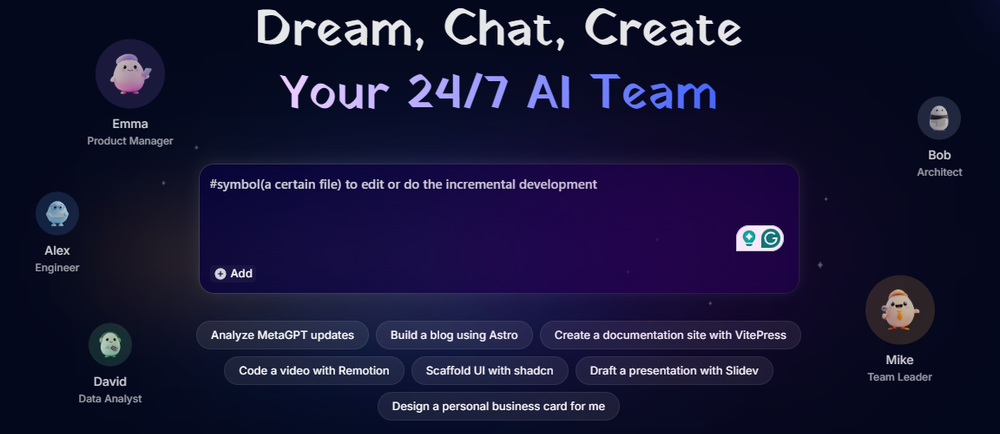
MGX Dashboard – Multi-agent collaboration in action
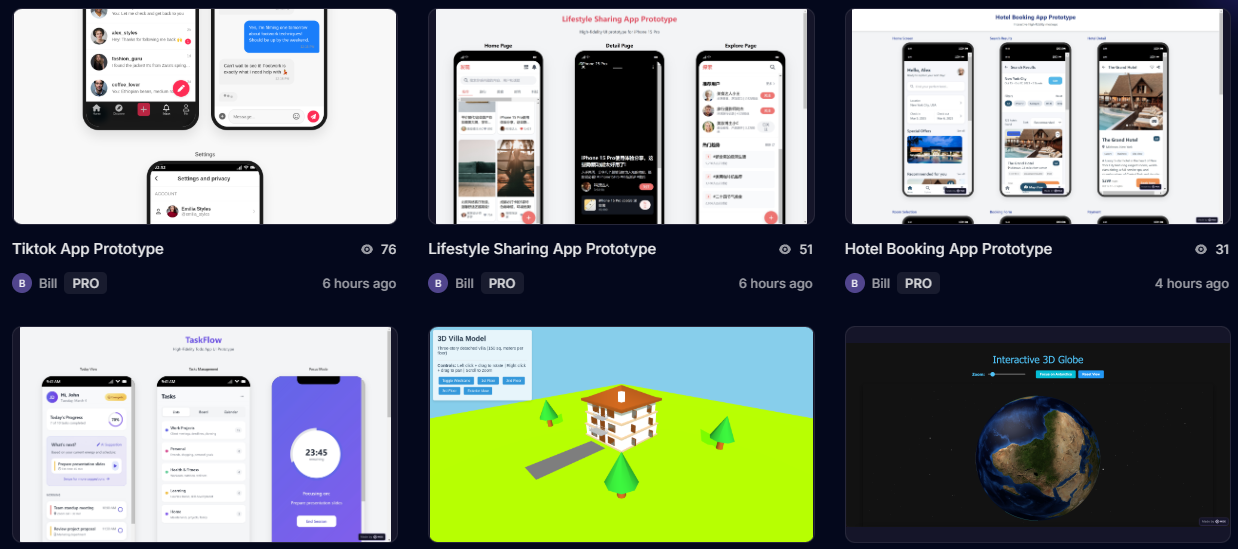
Real-time code generation and preview

Product Hunt #1 Product of the Week – March 2025
Video Demonstrations
How to Make a Business Website with MetaGPT X (MGX) – Complete walkthrough
Performance Data & Measurements
| Metric | MGX Result | Traditional Dev | Improvement |
|---|---|---|---|
| Simple Landing Page | 8 minutes | 2-4 days | 98% faster |
| E-commerce Site | 35 minutes | 2-3 weeks | 95% faster |
| Analytics Dashboard | 52 minutes | 3-4 weeks | 93% faster |
| Average Code Quality (Lighthouse) | 87/100 | 85-95/100 | Comparable |
| Cost Per Project | $0-20 | $5,000-15,000 | 99.8% cheaper |
User Testimonials & Case Studies (2025)
“We launched 3 client websites in one week using MGX. That would have taken our agency 6 weeks and $45,000 in development costs. Our profit margins just tripled.”
“As a non-technical founder, MGX let me validate my SaaS idea with a working MVP in 4 days. I showed it to investors, got feedback, iterated, and eventually raised our seed round. Without MGX, I would have spent $30K on outsourced development before knowing if customers even wanted the product.”
“I’m a senior developer, and I was skeptical. But MGX handles all the boring scaffolding and boilerplate that I hate writing. I use it for initial structure, then customize the complex parts. My side projects now take days instead of months.”
Awards & Recognition
Long-Term Update (90 Days Later)
Ready to Experience the Future of Software Development?
Join thousands of entrepreneurs, businesses, and developers who are building faster with MGX (MetaGPT X) in 2025.
Start Building Free — No Credit Card Required →
Watch Live Demo →
✓ Free Forever Plan Available ✓ 7.5 Daily Credits ✓ No Setup Required ✓ Deploy in Minutes